

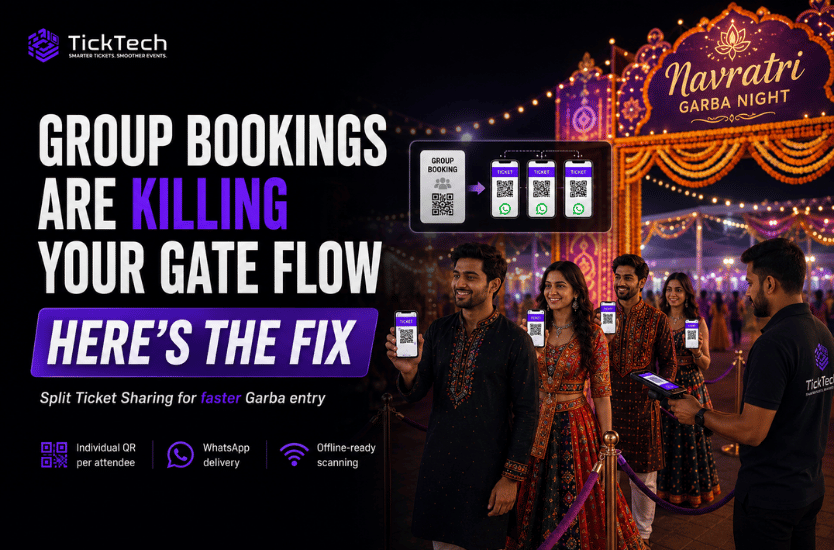

It’s 8:40 PM. The line at Gate 2 hasn’t moved in four minutes. A volunteer is squinting at a phone screen, trying to figure out if the QR code in front of them belongs to the person holding the phone — or to the four friends standing behind him, who all “chipped in” on the same booking.
Multiply that by every group booking at your event, and you don’t have a ticketing problem. You have a queue-length problem, a fake-ticket problem, and an angry-sponsor-standing-at-the-entrance problem, all wearing the same disguise: one QR code, five people.
Here’s why group bookings are the single biggest hidden drag on gate flow — and what actually fixes it.
The Math of Group Bookings
Most organisers plan gate throughput around total headcount. That’s the wrong number to plan around.
The number that actually determines how fast your line moves is coordination events per group — the moments where a gate scanner has to stop and resolve who’s really standing in front of them.
Think about how tickets to festivals, Garba nights, and college fests actually get bought: rarely one at a time. A friend circle books six seats on one card. A family books for the parents and both sets of grandkids. A WhatsApp group nominates one person to “handle the booking” for everyone. That’s normal buying behavior — but it means a huge share of your gate traffic doesn’t arrive as individuals with individual tickets. It arrives as clusters tied to one ticket-holder, and clusters don’t move through a gate the way single attendees do.
Now add the part every organiser already knows from experience: groups rarely arrive together. Someone’s parking the car. Someone’s still finding a spot to eat before heading in. Someone’s coming straight from work an hour after everyone else. Every one of those late or split arrivals is another coordination event — another moment where the ticket holder isn’t physically present, and someone at your gate has to make a judgment call.
Your bottleneck isn’t crowd size. It’s how many of those judgment calls your gate staff has to make per hour, under pressure, with a line building behind them.
Why a Single PDF (or Screenshot) Doesn’t Work
The default “solution” is usually: the person who booked forwards the ticket PDF, or takes a screenshot and sends it to whoever’s running late. It feels like it solves the problem. It actually creates three new ones.
- It can’t tell people apart. One QR code represents the whole group. Whether the person scanning it is the original buyer or the fourth friend who got the screenshot forwarded to them, the code reads the same. Your gate has no way to know.
- It leaks before the gate even opens. Once a ticket exists as an image in a chat thread, it can be forwarded again — to a friend of a friend, to a reseller, to someone who was never part of the original group. By the time you’re checking IDs at the door, you’ve lost visibility into who actually holds a legitimate pass.
- It kills your re-entry and headcount data. If five people are walking in on one ticket record, you can’t tell which of them left, which of them are still inside, or whether “the ticket” has already been used for the night. Re-entry policies, sponsor footfall numbers, and safety headcounts all quietly stop being accurate the moment a group ticket gets treated as one interchangeable file.
A single PDF was built for a world where one booking equals one person at the door. Group bookings break that assumption on day one.
Splitting Models, Compared
Not all “fixes” for this are equal. Here’s how the common approaches stack up:
| Approach | How it works | Where it breaks |
| No splitting | Whole group shares one QR, waits at the gate together | Bottlenecks the line; zero fraud protection; no per-person tracking |
| Manual re-issue | Organiser’s team manually re-sends separate tickets on request | Doesn’t scale past a handful of requests; needs staff on standby; slow right when speed matters most |
| Multi-QR PDF | One file, but with a separate QR printed for each seat in the booking | Still gets forwarded as a whole file; buyer can’t control who gets which QR; can’t be adjusted after the fact without support help |
| In-app self-service splitting | Buyer peels off individually-scannable tickets and sends each one to a phone number, any time before the gate scan | Requires a platform actually built for it — it can’t be bolted onto a plain email-and-PDF flow |
The first three are variations on “hope it works out.” Only the last one actually matches how groups behave in real life: uncertain until the last minute, coordinating over chat, and needing tickets to move as fast as their plans change.
Real Organiser Workflows
Picture a typical Garba night. A booker reserves six passes for the evening — three couples, one WhatsApp group chat coordinating the plan. Two hours before the event, two of them text: “running late, leaving straight from work, can you send our tickets separately?”
The old workflow: the booker screenshots the same QR twice, sends it over WhatsApp, and hopes gate staff don’t notice it’s the same code showing up more than once. Or they call the helpline and wait for someone to manually generate replacement tickets — while the queue outside keeps growing.
The workflow that actually works: the booker opens the app, taps the two names still in transit, and instantly generates two unique, independently scannable tickets sent straight to their phones — no app install required on their end, no waiting on support, no risk of the group’s original QR getting reused. Each of the six tickets is now trackable on its own: your gate knows exactly who’s inside, who hasn’t arrived, and whether re-entry is valid for each person individually.
Same group, same last-minute chaos — but the chaos stays in the group chat instead of showing up at your gate.
What to Ask Your Ticketing Vendor
Before you sign with anyone, get straight answers to these:
- Can a buyer split a group booking into individually-scannable tickets after purchase, or only at the moment of sale?
- Does splitting work if the gate is scanning offline, or does it require live connectivity on both the sender’s and the scanner’s end?
- Is each split ticket tracked as its own record for re-entry and headcount, or does the system still treat the whole group as a single line item?
- If a split ticket gets forwarded a second time, does the platform flag or block the repeat scan — or will your gate staff have no way of knowing?
- Can tickets be split and delivered over WhatsApp or SMS, or does the recipient need to install an app before they can use theirs?
If the answer to any of these is “we’d have to build that” or “our support team handles it manually,” you’ve found the crack where your gate revenue is leaking out.
This is exactly the gap TickTech’s Split Ticket Sharing was built to close — group bookings split into individually verifiable, instantly shareable tickets, working whether or not the gate has signal that night.
[See how Split Ticket Sharing works →]
Want to see it handle a real group booking at gate speed? Book a 15-minute demo and we’ll walk you through it.